[](https://pypi.org/project/gnwmanager/)
# GnWManager
GnWManager is THE game-and-watch device manager. GnWManager is a command line tool
who's responsible for getting firmware onto your device, managing the filesystem,
and other device administrative tasks.
GnWManager accomplishes this via a small bundled pre-compiled firmware that gets
executed from the STM32's RAM.
## Features
* Simple installation.
* Works on all operating systems (Linux, MacOS, Windows).
* Automatic debugging probe detection.
* No need to specify if you have a stlink, jlink, CMSIS-DAP, or Raspberry Pi.
* Fast internal and external flash firmware flashing.
* Hardware-accelerated hashing for rapid duplicate discovery.
* Only syncs changed data.
* Minimizes flash erases and writes, extending flash lifespan.
* Double buffered, asynchronous, LZMA-compressed transfers for maximum speed.
* Complete filesystem management.
* Backup and restore files.
* Interactive filesystem explorer.
* Automatic Real-Time-Clock (RTC) configuration.
* Developer tools:
* Easily monitor device ``printf`` statements and launch GDB sessions.
* Capture screenshots, regardless of the running firmware.
## Tutorials
Tutorials useful for typical end-users
- [Installation](tutorials/installation.md)
- [Device Unlocking](tutorials/unlock.md)
- [Binary Flashing](tutorials/flash.md)
- [Filesystem Management](tutorials/filesystem.md)
- [Extracting Screenshots](tutorials/screenshot.md)
Tutorials useful for developers
- [Device Locking](tutorials/lock.md)
- [Stdout Monitoring](tutorials/monitor.md)
- [Flash Erasing](tutorials/erase.md)
## Compatibility
GnWManager works with all major operating systems: Windows, Mac, and Linux.
GnWManager is also compatible with the following probes:
1. [Raspberry Pi Pico](https://www.raspberrypi.com/products/raspberry-pi-pico/) (Recommended)
2. [STLink](https://www.st.com/en/development-tools/st-link-v2.html)
3. [JLink](https://www.segger.com/products/debug-probes/j-link/#models)
4. [DAPLink](https://daplink.io)
5. [Raspberry Pi (GPIO)](https://projects.raspberrypi.org/en/projects/physical-computing/1)
#### Raspberry Pi Pico
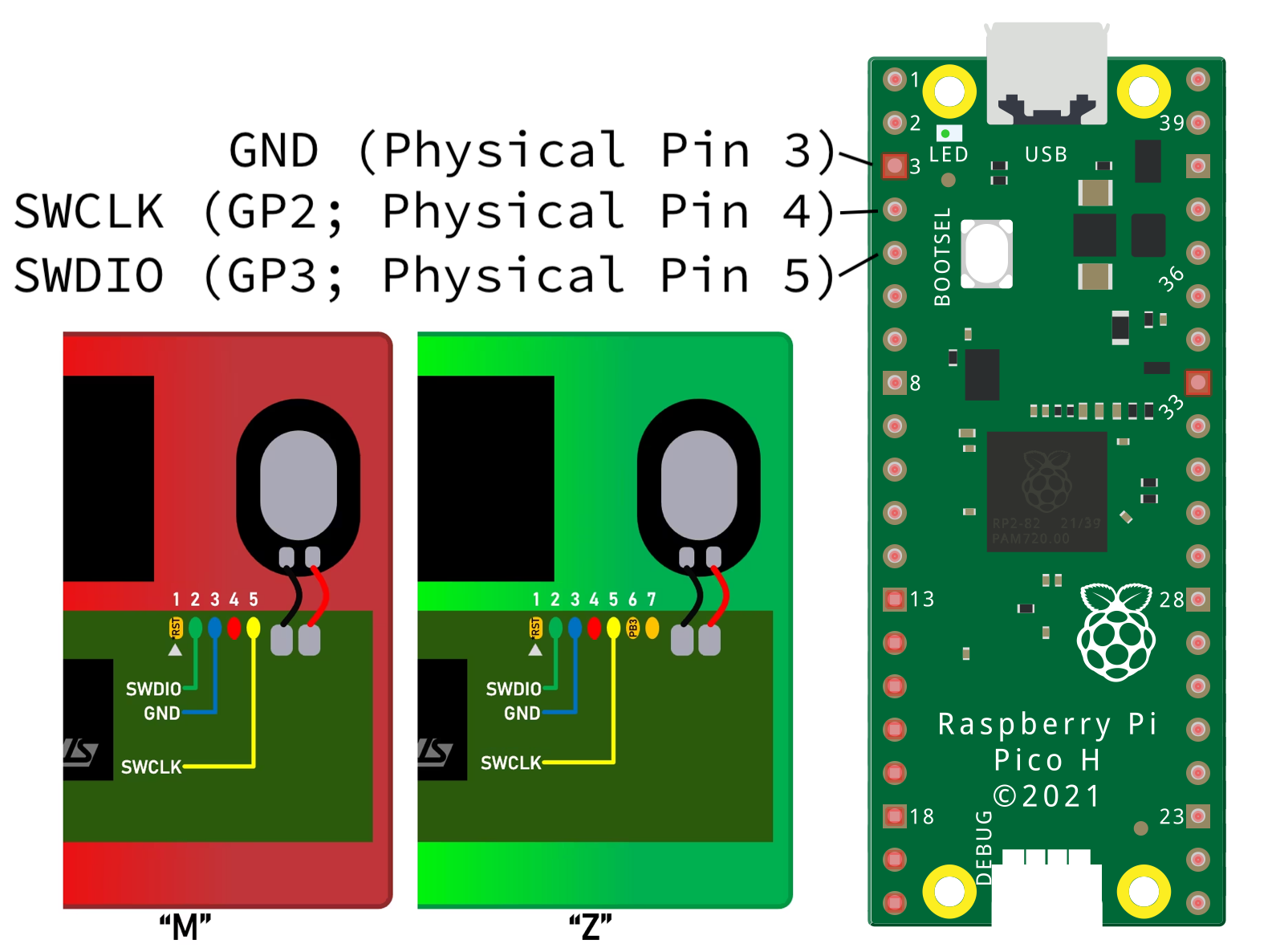
All Raspberry Pi Picos can be transformed into programmers via the [picoprobe project](https://github.com/raspberrypi/picoprobe).
1. Download `picoprobe.uf2` from [picoprobe releases](https://github.com/raspberrypi/picoprobe/releases).
2. Hold BOOT button on the pico and plug it into the computer. It should show up as a USB drive. Drag and drop `picoprobe.uf2` to it.
3. Hook up the 3 wires (GND, GP2, GP3) to (GND, SDCLK, SWDIO), respectively.
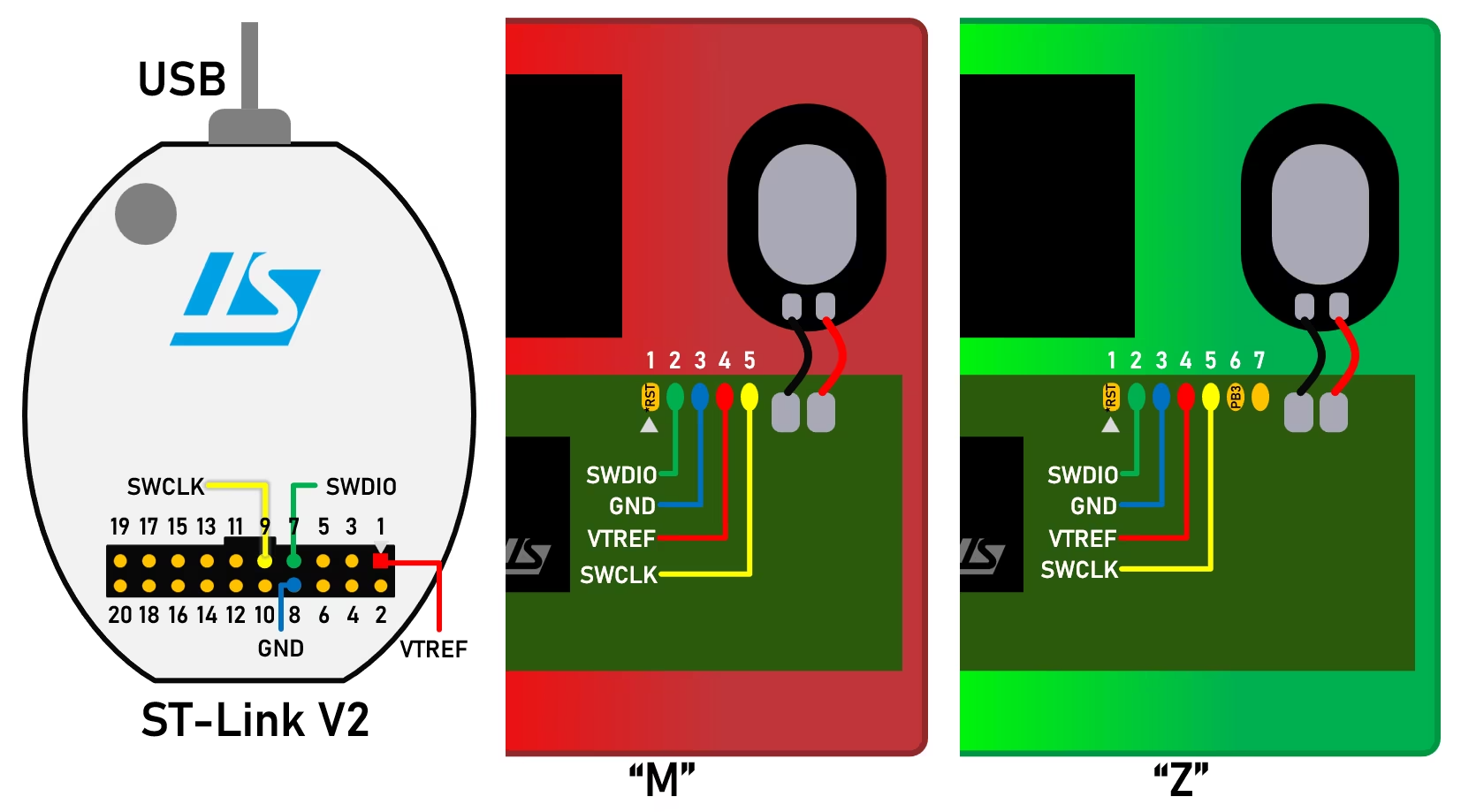
#### STLink
Hook up your STLink to your game and watch as follows:
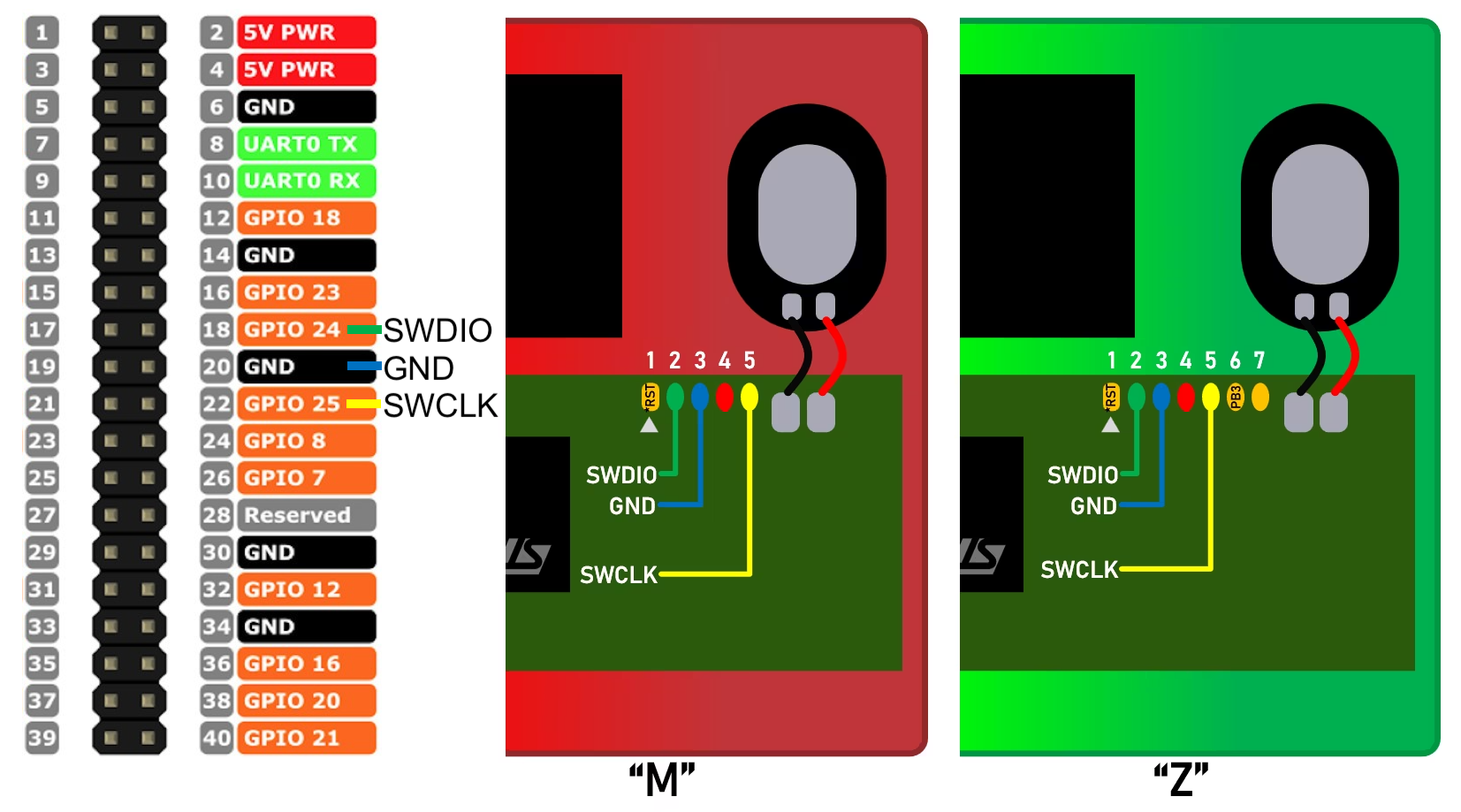
#### Raspberry Pi (GPIO)
Hook up your Raspberry Pi to your game and watch as follows:
## Usage
To see available commands, run `gnwmanager --help`.
```console
$ gnwmanager --help
Usage: gnwmanager [OPTIONS] COMMAND [ARGS]...
Game And Watch Device Manager.
Manages device flashing, filesystem management, peripheral configuration, and more.
╭─ Options ──────────────────────────────────────────────────────────────────────────╮
│ --version -v Print gnwmanager version. │
│ --frequency -f INT_PARSER Probe frequency. [default: None] │
│ --backend -b [pyocd] OCD Backend. [default: pyocd] │
│ --help Show this message and exit. │
╰────────────────────────────────────────────────────────────────────────────────────╯
╭─ Commands ─────────────────────────────────────────────────────────────────────────╮
│ debug GnWManager internal debugging tools │
│ disable-debug Disable the microcontroller's debug block. │
│ erase Erase a section of flash. │
│ flash Flash firmware to device. │
│ format Format device's filesystem. │
│ gdb Launch a gdbserver and connect to it with gdb. │
│ gdbserver Launch a gdbserver. │
│ install Install third party executables, like openocd. │
│ lock Re-lock your device. │
│ ls List contents of device directory. │
│ mkdir Create a directory on device. │
│ monitor Monitor the device's stdout logging buffer. │
│ mv Move/Rename a file or directory. │
│ pull Pull a file or folder from device. │
│ push Push file(s) and folder(s) to device. │
│ screenshot Capture and transfer screenshots from device. │
│ shell Launch an interactive shell to browse device filesystem. │
│ start Start firmware at location. │
│ tree List contents of device directory and its descendants. │
│ unlock Backs up and unlocks a stock Game & Watch console. │
╰────────────────────────────────────────────────────────────────────────────────────╯
```
## Need Help?
If you need any help, either open up a github issue here, or join the [stacksmashing discord](https://discord.gg/zBN3ex8v4p) for live help.
When sharing `gnwmanager` output, it is recommended to increase the verbosity level:
* Via CLI argument: `gnwmanager --verbosity=debug`
* Via environment variable `export GNWMANAGER_VERBOSITY=debug`
## Developer Installation
If developing for GnWManager, perform the following steps to setup your local environment.
We use [pre-commit](https://pre-commit.com/) to run linting, and [poetry](https://python-poetry.org/) for python management.
```bash
git clone git@github.com:BrianPugh/gnwmanager.git
cd gnwmanager
pre-commit install # Ensures linting passes prior to committing
poetry install
make -j4 # Builds stm32 firmware binaries.
```
When changing C sources, `make` must be re-ran to update the binaries located at:
```bash
gnwmanager/firmware.bin
gnwmanager/unlock.bin
```